

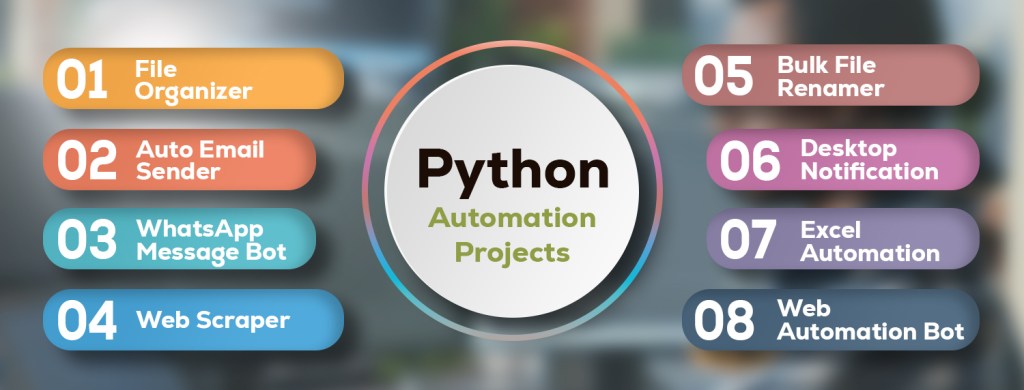
In a world that never stops generating tasks, automation is not just a luxury — it’s a necessity. Python has become the language of choice for people who want to make their computers work for them. It allows anyone, whether a beginner or an experienced developer, to automate daily routines, streamline workflows, and create elegant tools that simplify life. What’s more inspiring is that most of these automations can be built in just a weekend, giving you practical results and immediate satisfaction. In this article, we’ll explore eight real-world automation projects that combine creativity, simplicity, and powerful results. Each project includes a detailed explanation and working code, ready to run and expand.
1. File Organizer: Cleaning Your Digital Mess
Let’s be honest — everyone’s Downloads folder looks like a battlefield. PDFs, images, ZIP archives, and installers all live together in digital chaos. A File Organizer is one of the simplest yet most satisfying automation scripts you can build. It scans a target folder, detects the file extensions, creates categorized subfolders, and moves each file into its proper place. This saves time, reduces clutter, and gives your workspace a touch of order.
Beyond personal use, such automation can be scaled for offices to organize report folders, designers to manage creative assets, or photographers to sort by file type. It’s the foundation of file automation — understanding how to navigate directories, classify files, and manipulate them programmatically.
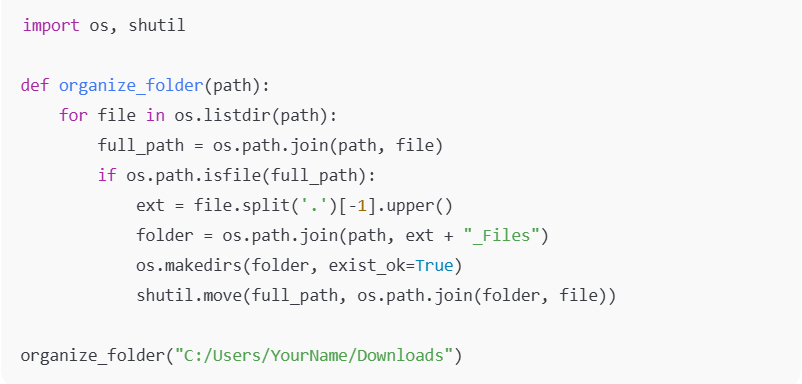
This script can be adapted to group by date, size, or even project names — the perfect first step toward smarter digital management.
2. Auto Email Sender: No More Repetitive Mail Work
Every professional has at least one recurring email to send: reports, invoices, weekly updates, or newsletters. Manually sending them every week is a waste of time. That’s where an Auto Email Sender steps in. Using Python’s smtplib and email libraries, you can compose and send messages automatically, even with attachments. You can integrate it with your reporting scripts to send data automatically at the end of each process.
This project teaches you about SMTP protocols, secure authentication, and automating digital communication. It also helps you understand how businesses automate entire email flows using scripts or scheduled tasks. You can later add personalization and dynamic content fetched from spreadsheets or databases.
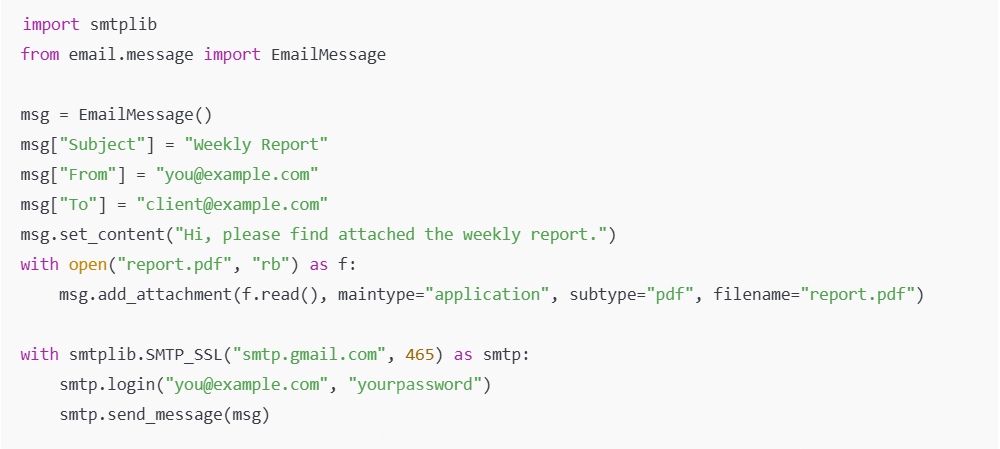
Set it on a scheduler, and you’ve got yourself an email assistant who never forgets or gets tired.
3. WhatsApp Message Bot: Smart Communication Made Easy
Imagine sending birthday wishes, reminders, or meeting alerts without lifting a finger. With the pywhatkit library, Python can automate WhatsApp messages right from your desktop. You define the message, the recipient, and the exact time — and the bot does the rest.
This project introduces you to simple automation that interacts with web applications through browser control. It’s particularly useful for small businesses or freelancers who manage multiple clients and want to send personalized yet automated updates. It’s also a gentle entry into browser-driven automation and time scheduling.

Once you see your computer send that message without your input, you’ll feel the real satisfaction of automation.
4. Web Scraper: Collect Data While You Sleep
Web scraping is the heart of data automation — a way to collect information automatically from websites without manual copy-paste work. Whether it’s scraping job listings, product prices, or blog titles, Python’s BeautifulSoup and requests libraries make the process simple and powerful.
A Web Scraper can become part of many real-world systems — price tracking bots, research tools, or content aggregators. It introduces you to the HTML structure of websites and teaches you how to extract meaningful patterns. It’s also an excellent first step toward data analytics, since most analysis begins with data collection.
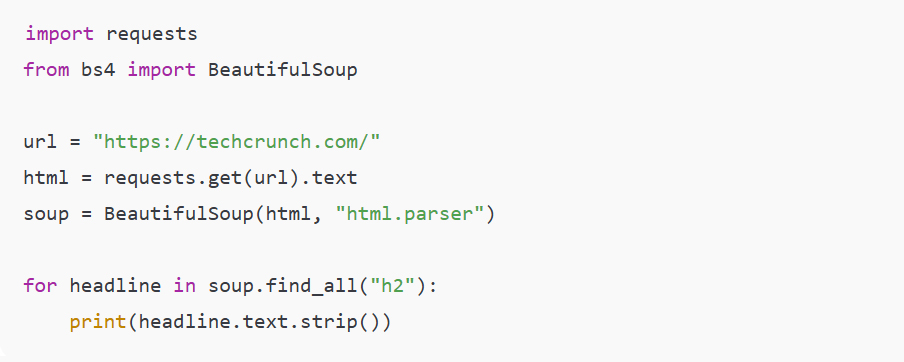
Once you’ve mastered this, you can expand it to scrape multiple pages, store data in CSV files, and even monitor changes over time.
5. Bulk File Renamer: Perfect Naming Every Time
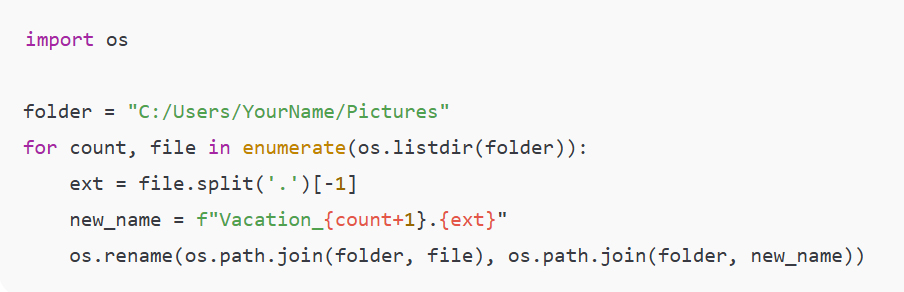
If you’ve ever had to rename hundreds of files — like photos, documents, or reports — you know the pain. The Bulk File Renamer eliminates that pain instantly. By looping through files in a folder, you can rename them with a consistent pattern, making them searchable and organized.
This project is particularly helpful for creative professionals, teachers, or office administrators. It introduces iteration and string formatting while giving immediate practical benefits.
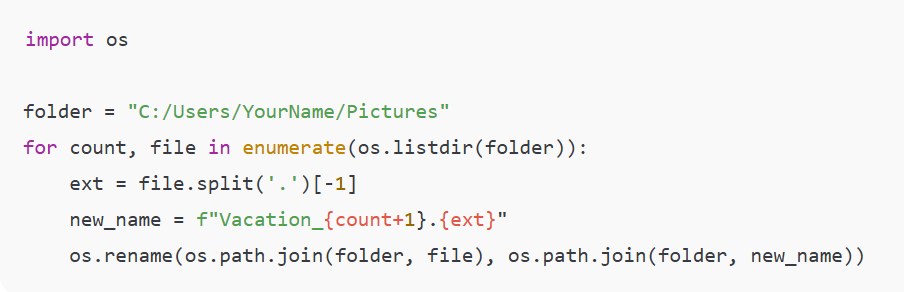
After you run it, your files will instantly follow a perfect naming convention — a simple yet satisfying reward for your Python skills.
6. Desktop Notification App: Keep Yourself on Track
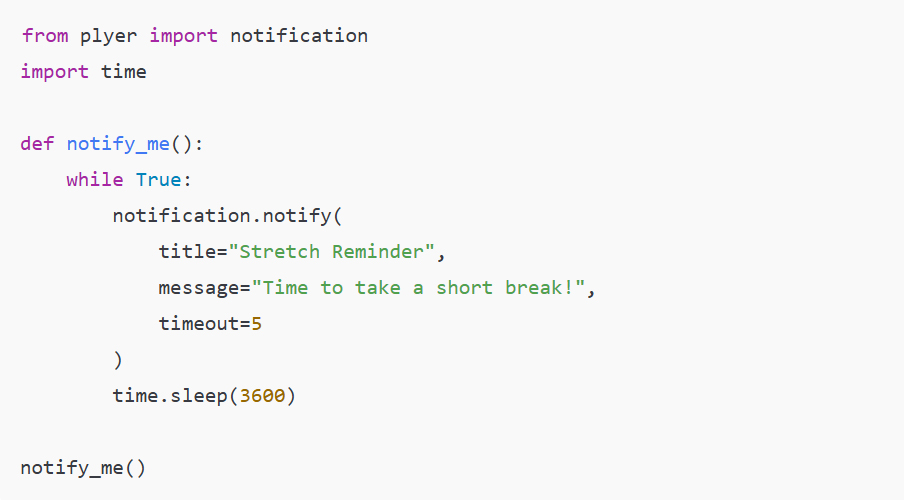
Modern life is full of distractions, and sometimes the simplest automation can bring balance. A Desktop Notification App is one of those. You can make Python send you notifications — like reminding you to stretch, hydrate, or check an important site. The plyer library makes it surprisingly easy.
This project is not just about productivity; it teaches you how applications communicate with your operating system and how automation can serve human well-being, not just efficiency.
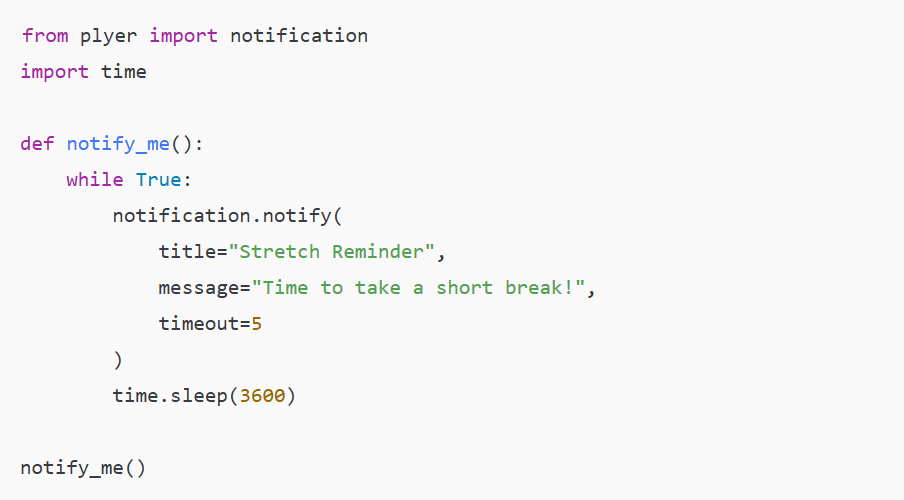
You can even connect it to other scripts to notify you when a background task finishes or when a website updates.
7. Excel Automation: Reports That Build Themselves
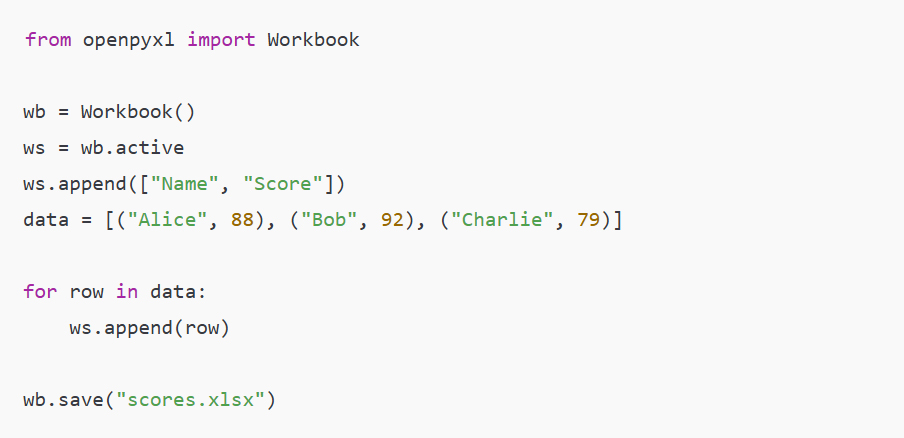
If your work involves data or reporting, Excel Automation is a game changer. Instead of manually updating sheets, you can use Python’s OpenPyXL library to fill in data, apply formulas, and save formatted Excel reports automatically.
This automation is especially powerful for analysts, accountants, teachers, or managers who regularly produce structured reports. It introduces concepts of data manipulation, file writing, and office integration — all essential skills for business automation.
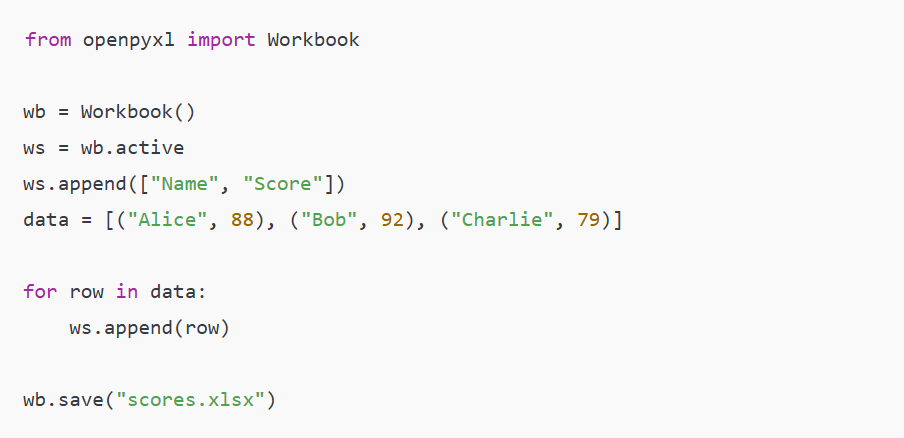
Once you understand this foundation, you can automate monthly reports, combine multiple data sources, or even generate charts directly from Python.
8. Web Automation Bot: The Gateway to Advanced Automation
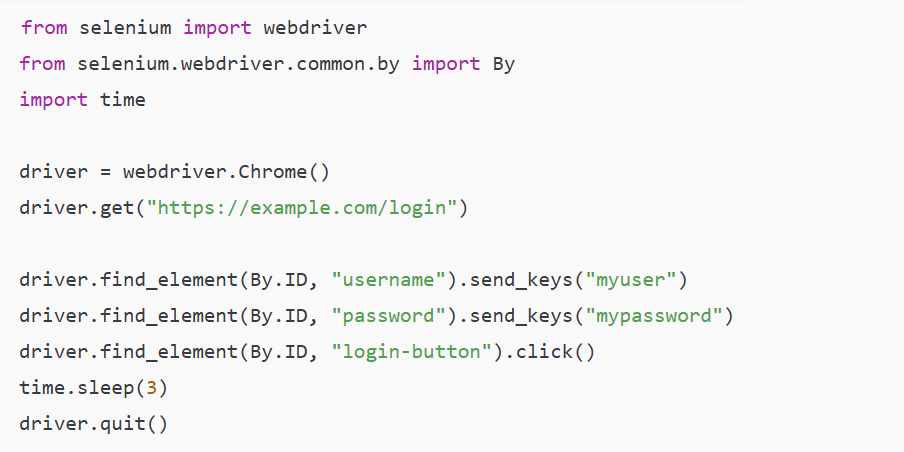
Finally, the Web Automation Bot. This is where automation meets intelligence. With Selenium, you can control a real browser — open websites, log in, click buttons, and extract information — just like a human would. It’s used in automated testing, social media bots, and even e-commerce monitoring tools.
This project teaches browser control, DOM manipulation, and event simulation. It’s a more advanced automation, but once you build it, you’ll see how close you are to creating full-scale automation systems.
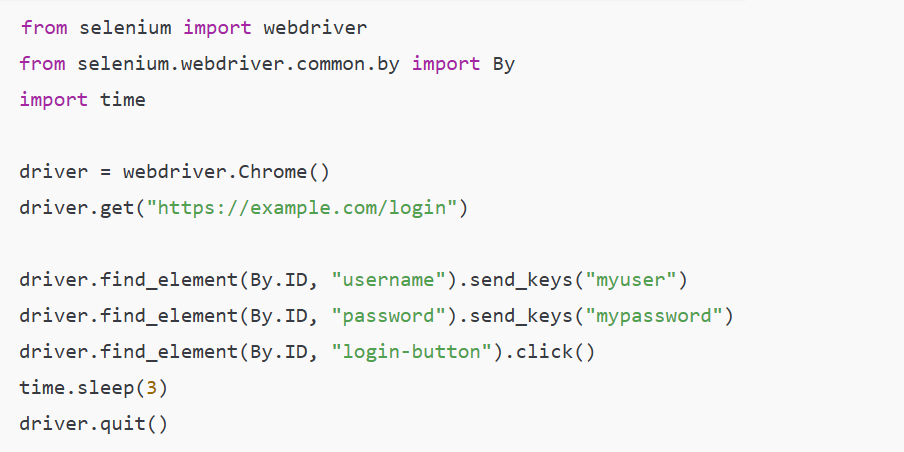
From here, you can scale up to automate entire workflows — logging into dashboards, downloading reports, or posting updates online.
Conclusion
Each of these projects represents a small window into a much larger world — the world of automation-driven thinking. What makes them valuable isn’t just the code but the mindset they build: the idea that every repetitive task can be transformed into a system that runs on its own. Once you start building these automations, you begin to see possibilities everywhere — from your desktop to your business processes. So, take this weekend to experiment, learn, and enjoy the moment when your computer starts working for you instead of the other way around.
ثمانية مشاريع أتمتة بايثون عملية لإتقانها في 48 ساعة
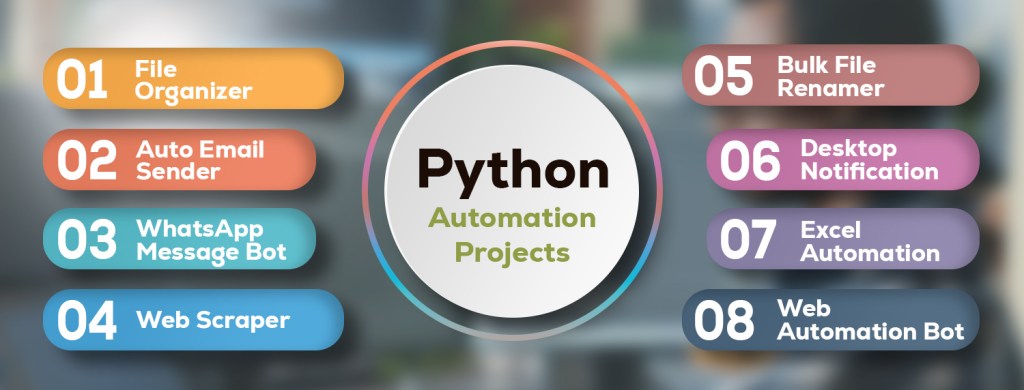
في عالمٍ لا يتوقف فيه توليد المهام لم تعد الأتمتة مجرد ترف بل ضرورة، إذ أصبحت بايثون اللغة المفضلة لمن يرغبون في تشغيل حواسيبهم فهي تتيح لأي شخص أتمتة روتينه اليومي وتبسيط سير العمل وإنشاء أدوات أنيقة تُبسط الحياة سواءً كان مبتدئاً أو مطوراً خبيراً، والأمر الأكثر إلهاماً هو إمكانية بناء معظم هذه الأتمتة في عطلة نهاية أسبوع واحدة فقط أي خلال 48 ساعة مما يمنحك نتائج عملية ورضا فورياً
وفي هذه المقالة سنستكشف ثمانية مشاريع أتمتة عملية تجمع بين الإبداع والبساطة والنتائج الفعّالة، بحيث يتضمن كل مشروع شرحاً مفصلاً وشيفرة برمجية جاهزة للتشغيل والتوسع
1. منظم الملفات: تنظيم الفوضى الرقمية
لنكن صريحين – يبدو مجلد التنزيلات لدى الجميع أشبه بساحة معركة
وملفات التثبيت ZIP والصور وملفات PDF فملفات
كلها تعيش معاً في فوضى رقمية، فمُنظّم الملفات يعدُّ أحد أبسط نصوص الأتمتة وأكثرها إرضاءً على الإطلاق فهو يفحص المجلد المُستهدف ويكتشف امتدادات الملفات ويُنشئ مجلدات فرعية مُصنّفة وينقل كل ملف إلى مكانه المُناسب، هذا يُوفّر الوقت ويُقلّل الفوضى ويُضفي على مساحة عملك لمسةً من التنظيم، وبعيداً عن الاستخدام الشخصي يُمكن توسيع نطاق هذه الأتمتة لتشمل المكاتب لتنظيم مجلدات التقارير وللمصممين لإدارة الأصول الإبداعية وللمصورين للفرز حسب نوع الملف، إنه أساس أتمتة الملفات – فهم كيفية التنقل بين المجلدات وتصنيف الملفات ومعالجتها برمجياً
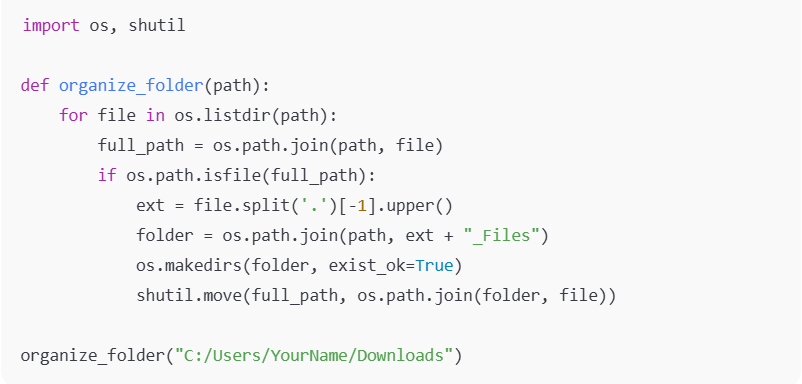
يمكن تعديل هذا النص البرمجي للتجميع حسب التاريخ أو الحجم أو حتى أسماء المشاريع، وهي الخطوة الأولى المثالية نحو إدارة رقمية أكثر ذكاءً
2. مُرسِل البريد الإلكتروني التلقائي: لا مزيد من العمل البريدي المُكرّر
يُرسل كل مُحترف بريداً إلكترونياً واحداً على الأقل بشكل مُتكرر: تقارير، فواتير، تحديثات أسبوعية، أو رسائل إخبارية، فإرسالها يدوياً كل أسبوع مُضيعة للوقت، هنا يأتي دور مُرسِل البريد الإلكتروني التلقائي
والبريد الإلكتروني في بايثون smtplib فباستخدام مكتبات
يمكنك إنشاء الرسائل وإرسالها تلقائياً حتى مع المرفقات يمكنك دمجه مع نصوص التقارير لإرسال البيانات تلقائياً في نهاية كل عملية
والمصادقة الآمنة SMTP يُعلّمك هذا المشروع بروتوكولات
وأتمتة الاتصالات الرقمية، كما يُساعدك على فهم كيفية أتمتة الشركات لتدفقات البريد الإلكتروني بالكامل باستخدام النصوص أو المهام المجدولة، يمكنك لاحقاً إضافة محتوى مُخصص وديناميكي من جداول البيانات أو قواعد البيانات
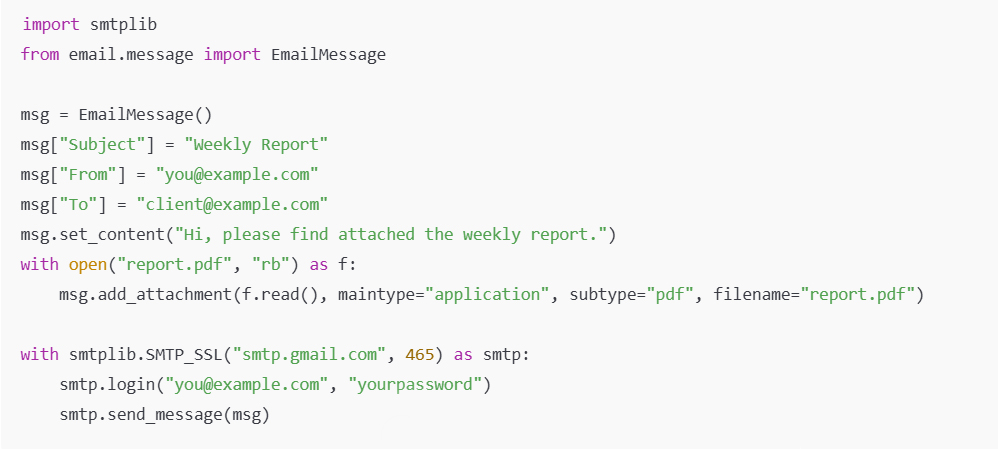
باستخدام مُجدول ستحصل على مُساعد بريد إلكتروني لا ينسى ولا يتعب أبداً
3. بوت رسائل واتساب: تواصل ذكي سهل
تخيل إرسال تهنئة عيد ميلاد أو تذكيرات أو تنبيهات اجتماعات دون أي عناء
يُمكن لبايثون أتمتة رسائل واتساب مُباشرةً من سطح مكتبك pywhatkit فمع مكتبة
ما عليك سوى تحديد الرسالة والمُستلِم والوقت المُحدد – وسيتولى البوت الباقي، يُعرّفك هذا المشروع على أتمتة بسيطة تتفاعل مع تطبيقات الويب من خلال التحكم في المتصفح وهو مفيد بشكل خاص للشركات الصغيرة أو المستقلين الذين يديرون عملاء متعددين ويرغبون في إرسال تحديثات مخصصة وتلقائية في آنٍ واحد، كما أنه يُمثل مدخلاً سهلاً إلى الأتمتة المُدارة من خلال المتصفح وجدولة الوقت

بمجرد أن ترى جهاز الكمبيوتر الخاص بك يُرسل تلك الرسالة دون تدخل منك ستشعر بالرضا الحقيقي عن الأتمتة
4. كشط البيانات من الويب: اجمع البيانات أثناء نومك
يُعدّ كشط البيانات من الويب جوهر أتمتة البيانات، فهو طريقة لجمع المعلومات تلقائياً من مواقع الويب دون الحاجة إلى النسخ واللصق اليدوي، فسواءً كان الأمر يتعلق بكشط قوائم الوظائف أو أسعار المنتجات أو عناوين المدونات
ومكتبات الطلبات في بايثون BeautifulSoup فإن مكتبة
تجعل العملية بسيطة وفعالة، يمكن أن يُصبح كشط البيانات من الويب جزءاً من العديد من الأنظمة العملية مثل روبوتات تتبع الأسعار وأدوات البحث أو مُجمّعات المحتوى
لمواقع الويب HTML يُعرّفك على بنية
ويُعلّمك كيفية استخراج أنماط ذات معنى، كما أنه خطوة أولى ممتازة نحو تحليلات البيانات حيث تبدأ معظم التحليلات بجمع البيانات
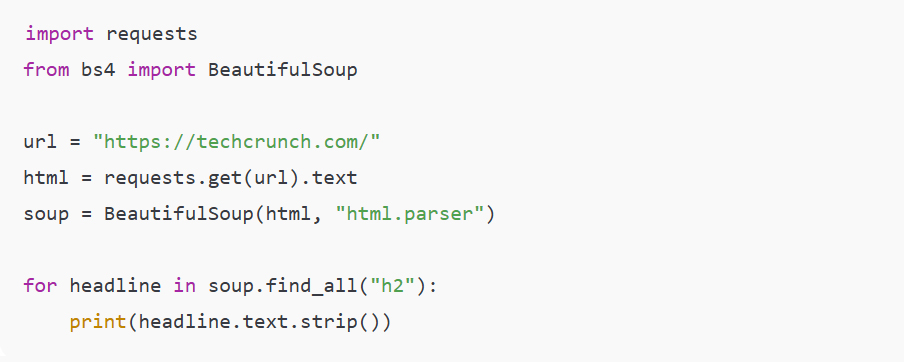
بمجرد إتقان هذه الميزة يمكنك توسيعها لاستخراج صفحات متعددة وتخزين البيانات في ملفات CSV وحتى مراقبة التغييرات مع مرور الوقت
٥. إعادة تسمية الملفات المجمعة: تسمية مثالية في كل مرة
إذا سبق لك أن اضطررت لإعادة تسمية مئات الملفات ( مثل الصور أو المستندات أو التقارير ) فمهمتك مرهقة وصعبة للغاية، تُزيل أداة إعادة تسمية الملفات المجمعة هذه الصعوبة فوراً، فمن خلال تكرار الملفات في مجلد يمكنك إعادة تسميتها بنمط متسق مما يجعلها قابلة للبحث ومنظمة، هذا المشروع مفيد بشكل خاص للمحترفين المبدعين والمعلمين ومسؤولي المكاتب فهو يُقدم التكرار وتنسيق السلاسل النصية مع توفير فوائد عملية فورية
بعد تشغيله ستتبع ملفاتك فوراً اصطلاح تسمية مثالي – مكافأة بسيطة ولكنها مُرضية لمهاراتك في بايثون
٦. تطبيق إشعارات سطح المكتب: حافظ على تركيزك
الحياة العصرية مليئة بالمشتتات وأحياناً تُحقق أبسط الأتمتة التوازن، تطبيق إشعارات سطح المكتب هو أحد هذه التطبيقات، إذ يمكنك جعل بايثون يرسل لك إشعارات مثل تذكيرك بالتمدد أو شرب الماء أو زيارة موقع مهم، مساعدك المذهل في هذه العملية
فهي تُسهّل الأمر بشكل رائع Plyer هو مكتبة
لا يقتصر هذا المشروع على الإنتاجية فحسب؛ بل يُعلّمك كيفية تواصل التطبيقات مع نظام التشغيل لديك وكيف يُمكن للأتمتة أن تُعزز رفاهية الإنسان وليس الكفاءة فحسب
يمكنك أيضاً ربطه ببرامج نصية أخرى لإعلامك عند انتهاء مهمة خلفية أو عند تحديث موقع ويب
٧. أتمتة إكسل: تقارير تُبنى ذاتياً
إذا كان عملك يتضمن بيانات أو تقارير فإن أتمتة إكسل تُحدث نقلة نوعية، فبدلاً من تحديث جداول البيانات يدوياً
من بايثون OpenPyXL يُمكنك استخدام مكتبة
لملء البيانات وتطبيق الصيغ وحفظ تقارير إكسل المُنسّقة تلقائياً
هذه الأتمتة فعّالة بشكل خاص للمحللين والمحاسبين والمعلمين والمديرين الذين يُصدرون تقارير مُهيكلة بانتظام، إذ يُقدّم هذا الكتاب مفاهيم معالجة البيانات وكتابة الملفات وتكامل المكاتب – وهي مهارات أساسية لأتمتة الأعمال
بمجرد فهمك لهذه الأساسيات يمكنك أتمتة التقارير الشهرية ودمج مصادر بيانات متعددة أو حتى إنشاء مخططات بيانية مباشرةً من بايثون
8. بوت أتمتة الويب: بوابة الأتمتة المتقدمة
وأخيراً بوت أتمتة الويب وهنا تلتقي الأتمتة بالذكاء، فمع سيلينيوم يمكنك التحكم في متصفح حقيقي – فتح مواقع الويب وتسجيل الدخول والنقر على الأزرار واستخراج المعلومات – تماماً كما يفعل الإنسان، يُستخدم في الاختبارات الآلية وروبوتات وسائل التواصل الاجتماعي وحتى أدوات مراقبة التجارة الإلكترونية
يُعلّم هذا المشروع التحكم في المتصفح
ومحاكاة الأحداث (DOM) ومعالجة نماذج الكائنات
إنه أتمتة أكثر تقدماً ولكن بمجرد إنشائه ستدرك مدى قربك من إنشاء أنظمة أتمتة شاملة
من هنا يمكنك التوسع لأتمتة سير العمل بالكامل – تسجيل الدخول إلى لوحات المعلومات وتنزيل التقارير أو نشر التحديثات عبر الإنترنت
الخلاصة
يُمثل كلٌّ من هذه المشاريع نافذةً صغيرةً على عالمٍ أوسع بكثير – عالم التفكير المُدار بالأتمتة، ما يجعلها قيّمةً ليس فقط الكود بل العقلية التي تُكوّنها: فكرة أن كل مهمةٍ متكررةٍ يمكن تحويلها إلى نظامٍ يعملُ تلقائياً، فبمجرد البدء في بناء هذه الأتمتة ستبدأ برؤية الإمكانيات في كل مكان – من سطح المكتب إلى عمليات عملك، لذا استغل عطلة نهاية الأسبوع هذه للتجربة والتعلم والاستمتاع باللحظة التي يبدأ فيها جهاز الكمبيوتر بالعمل لصالحك بدلاً من العكس
 Data World