
The 5 Most Difficult Questions to Ask a Machine Learning Interview Applicant

Advertisements

As an applicant for an interview in data science and related sciences, you may notice that the success rates seem low compared to the number of applicants. You may notice that the level of questions becomes more difficult in the advanced stages of the interview, especially when questions related to machine learning are asked. In fact, the questions may seem difficult at first. The first is often the failure to answer as a result of confusion, which usually leads to the failure of the applicant.

Anyone who can avoid falling into this trap can benefit from his previous stumbling blocks and turn them into strengths that will help him overcome this interview with ease because he has become fully aware of the level and method of asking difficult questions.

Of course, not all applicants will wait until they fail to become aware of the level of questions and answer them in another interview. Here we exclude a small group of applicants who are fully prepared for any kind of questions. For them, machine learning is a specialty and they deal with it professionally, making them able to face the questions that constitute For others, it is a bump that is difficult to overcome, so in this article, for example, we will address, for example, the five most difficult questions that are classified as difficult in interviews related to machine learning. Understanding these questions that form the basic concepts in machine learning will undoubtedly make the applicant in a position of strength when he is tested with them.

Question 1: What is the difference between XGBoost and Gradient Boosting?

The obvious answer to this question may seem to you that XGBoost is the most suitable application for dealing with Gradient Descent, and this answer is not wrong, but the questioner is trying to extract the skills of the applicant through an answer that indicates that the respondent is a professional data scientist

  • So the expected answer will be as follows:
  • XGBoost has a requirement to get the job done
  • XGBoost has a built-in technology for handling null values by a mechanism called sparsity awareness
  • Uses gradients that are based on similarity scores
  • It has a great role in speeding up the calculations
  • Parallelism to find (variable – threshold) groups on huge data sets using weighted quantitative sketch technique

Question 2: What are the best uses for regression evaluation scales?

the answer :

Evaluation criteria used in regression:

R2 is very common in detecting the presence of regression, as it explains by the percentage of variance in the function that is explained by the independent variables

MSE loss function

RMSE Root mean square variance

MAPE is the average percentage of absolute error, which is the most appropriate measure for the commercial activity, as its work is based on giving a percentage of error in the average prediction values

How do you use the most appropriate option for each of: MSE and RMSE?

Use the RMSE which is the same scale as the actual scale

Use MSE on the squared scale

Advertisements

Question 3: How can overfitting be controlled using cross-validation?

the answer :

It is important to know that cross-validation enables you to identify redundant composition without the possibility of controlling it

In order to be able to control it, we must do the following:

  • Selection and engineering of features
  • If the algorithm is linear, outliers must be processed
  • Parameter setting
  • Early stop
  • Organization
  • Try to get as much data as possible

Question 4: What are precision and recall?

Let’s say that out of 18 expected fraud incidents, 12 were classified as true, and in this context, 80% of all fraud incidents were found. Precision and recall

Answer: Let’s create the following matrix:
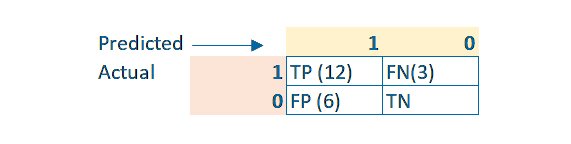
Precision = TP/(TP + FP) = 12/18 = 0.66

Recall = TP/(TP + FN) = 12/15 = 0.8

If your information is superficial on this subject, you will feel confused

On the contrary, if you are well versed, you will find that the answer is already in the question

Recall: What percentage of the actual 1s were correctly predicted = 80% = 0.8

Precision: How accurate were the predictions? Out of 18 predictions, 12 were correct, so 12/18 = 0.66.

It is noted here that TN is not a question and is not even required for both Recall and Precision

Question 5: What are the differences between Bagging and Boosting?

Bagging:

  • Creating a large number of decision trees that enable the final prediction to be obtained
  • Possibility to create decision trees on the dependent actual value
  • Possible poor results on random datasets

Boosting:

  • The dependence of the following tree on the prediction residuals on the last decision tree is the sequence of the beginners
  • Create trees on the tailings
  • Work well on random data set as it focuses on misclassified samples

Based on your knowledge of the previous points, you can choose between the two jobs

Advertisements

أصعب 5 أسئلة يمكن أن تطرح على المتقدم إلى مقابلة التعلم الآلي

Advertisements

قد تلاحظ كمتقدم لمقابلة في علوم البيانات وما يتفرع عنها من علوم أن معدلات النجاح تبدو منخفضة قياساً إلى عدد المتقدمين، قد تلاحظ أن مستوى الأسئلة يزداد صعوبة في مراحل متقدمة من المقابلة وخصوصاً عندما يتم طرح الأسئلة المتعلقة بالتعلم الآلي، في الحقيقة الأسئلة قد تبدو صعبة للوهلة الأولى وغالباً ما يكون التعثر في الإجابة نتيجة الارتباك الذي عادةً ما يؤدي إلى فشل المتقدم

يستطيع تجنب الوقوع في هذه المصيدة من يستفيد من عثرته السابقة ويحولها إلى نقاط قوة تعينه على تجاوز هذه المقابلة بسهولة ويسر لأنه بات على اطلاع تام على مستوى وأسلوب طرح الأسئلة الصعبة

بالطبع ليس كل المتقدمين سينتظرون إلى أن يفشلوا ليصبحوا على دراية بمستوى الأسئلة ويجيبوا عليها في مقابلة أخرى، نحن هنا نستثني فئة قليلة من المتقدمين المستعدين تماماً إلى أي نوع من الأسئلة، فالتعلم الآلي بالنسبة لهم هو اختصاص ويتعاملون معه باحترافية تجعلهم قادرين على مواجهة الأسئلة التي تشكل بالنسبة لغيرهم عثرة يصعب تجاوزها، لذا فسنتناول في مقالتنا هذه على سبيل المثال لا الحصر أكثر خمسة أسئلة تصنف على أنها صعبة في المقابلات المتعلقة بالتعلم الآلي، فهم هذه الأسئلة التي تشكل المفاهيم الأساسية في التعلم الآلي سيجعل بلا شك المتقدم في موضع قوة عندما يتم اختباره بها

:السؤال الأول

Gradient Boosting و XGBoost  ما الفرق بين

قد تبدو لك الإجابة البديهية على هذا السؤال

هو التطبيق الأنسب XGBoost أن

Gradient Descent للتعامل مع

وهذه الإجابة ليست خاطئة ولكن السائل يحاول استخراج مهارات المتقدم من خلال إجابة تدل على أن المجيب عالِم بيانات محترف لذا فالإجابة المنتظرة ستكون على النحو الآتي

لديه شرط لإنجاز المهمة XGBoost

XGBoost يحتوي

على تقنية مدمجة للتعامل مع القيم الفارغة

sparsity awareness  بواسطة آلية تسمى

يستخدم التدرجات التي تعتمد على درجات التشابه

لها دور كبير في تسريع العمليات الحسابية

التوازي للعثور على مجموعات ( متغيرة – عتبة ) على مجموعات البيانات الضخمة باستخدام تقنية الرسم الكمي الموزون

السؤال الثاني: ماهي الاستخدامات الأمثل لمقاييس تقييم الانحدار؟

: الإجابة

:معايير التقييم المستخدمة في الانحدار

هو شائع كثيراً في الكشف عن وجود الانحدار R2

فهو يشرح بنسبة مئوية التباين في التابع الذي يتم تفسيره بواسطة المتغيرات المستقلة

وظيفة الخسارة MSE

جذر المتوسط التربيعي للتباين RMSE

متوسط النسبة المئوية للخطأ المطلقMAPE

وهو المقياس الأنسب للنشاط التجاري فعمله قائم على إعطاء نسبة مئوية للخطأ في متوسط قيم التنبؤ

كيف تستخدم الخيار الأنسب

؟ MSE و RMSE : لكل من

RMSE استخدام

وهو نفس المقياس الموجود في المقياس الفعلي

MSE استخدام

على المقياس التربيعي

Advertisements

: السؤال الثالث

overfitting كيف يمكن ضبط عملية

باستخدام التحقق المتبادل؟

:الإجابة

من الضروري أن تعلم أن التحقق المتبادل يمكنك من تحديد التركيب الزائد دون إمكانية التحكم فيه

:ولنتمكن من التحكم فيه علينا إجراء الآتي

 اختيار وهندسة الميزات *

 إذا كانت خوارزمية خطية يجب معالجة القيم المتطرفة *

 ضبط المعلمة *

 التوقف المبكر *

 التنظيم *

محاولة الحصول على مزيد من البيانات قدر المستطاع *

: السؤال الرابع

؟ precision  و recall ما هي

لنقل أنه من أصل 18 حادثة احتيال متوقعة تم تصنيف 12 منها على أنها صحيحة وفي هذا السياق تم العثور على 80 % من إجمال حوادث الاحتيال

precision   و recall اذكر

:الجواب

:لنقوم بإنشاء المصفوفة التالية
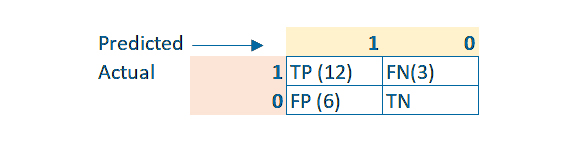
Precision = TP/(TP + FP) = 12/18 = 0.66

Recall = TP/(TP + FN) = 12/15 = 0.8

إن كانت معلوماتك سطحية حول هذا الموضوع ستشعر بالارتباك

وعلى العكس تماماً إن كنت متمكن جيداً فستجد أن الإجابة موجودة أصلاً بالسؤال

: Recall

1s ما هي النسبة المئوية من

الفعلية التي تم توقعها بشكل صحيح = 80٪ = 0.8

: Precision

ما مدى دقة التنبؤات، من أصل 18 تنبؤ ، كان 12 منها صحيحاً ومن ثم 12/18 = 0.66

TN ومن الملاحظ هنا أن

ليس سؤالاً وليس مطلوباً

Recall و Precision حتى لكل من

السؤال الخامس: ما هي أوجه الاختلاف

Bagging  و  Boosting بين

: Boosting

اعتماد الشجرة التالية على بقايا التنبؤ على آخر شجرة قرار فهو تسلسل المبتدئين *

إنشاء الأشجار على المخلفات *

العمل بشكل جيد على مجموعة البيانات العشوائية فهو يركز على العينات المصنفة بشكل خاطئ *

 : Bagging

إنشاء عدد كبير من أشجار القرار تمكِّن من الحصول على التنبؤ النهائي *

إمكانية إنشاء أشجار قرار على القيمة الفعلية التابعة *

من الممكن إعطاء نتائج رديئة على مجموعات البيانات العشوائية *

فبناءً على معرفتك بالنقاط السابقة تستطيع الاختيار بين الوظيفتين

Advertisements

10Excel functions for data analysis

Advertisements

The Excel program is one of the programs that has features and characteristics that help the user to analyze data easily, and due to the multiple formulas and functions it provides that are capable of carrying out a set of operations, from which we will discuss in our article these functions of calculations, character and date text tasks, and a set of other research tasks

1. CONCATENATE

This formula is considered one of the most effective formulas in analyzing data, despite its ease and simplicity of working with it. Its task is to use dates, texts, numbers, and different data present in several cells and merge them into one cell.

SYNTAX = CONCATENATE (text1, text2, [text3], …)

Concatenate multiple cell values

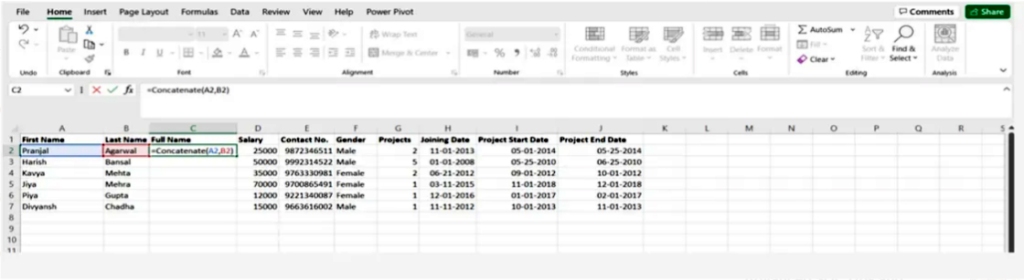
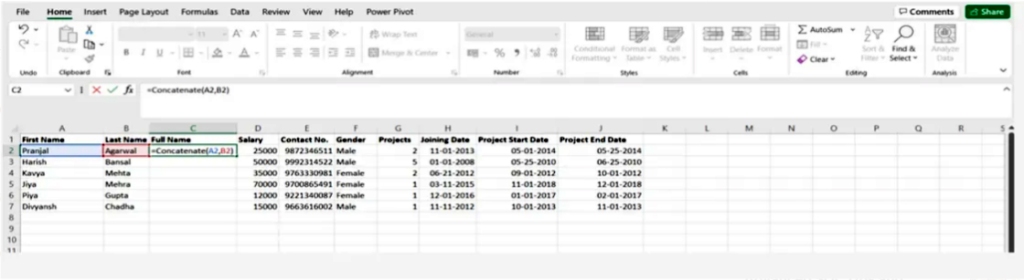
The simple CONCATENATE formula for the values of two cells A2 and B2 is as follows:

= CONCATENATE (A2, B2)

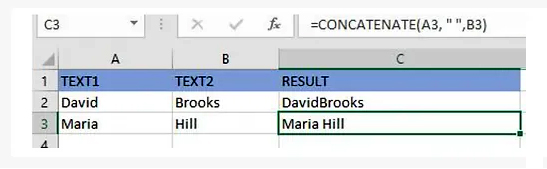
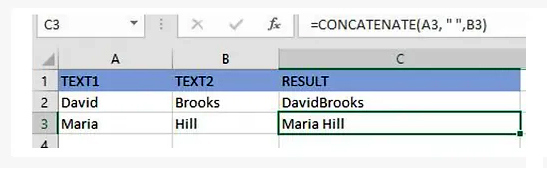
The values will be combined without using any delimiter, and to separate the values with a space we use “ ”

=CONCATENATE(A3, “ “, B3)

Connect a string of texts and the computed value

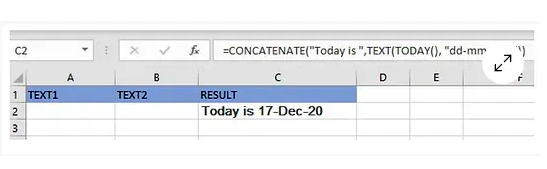
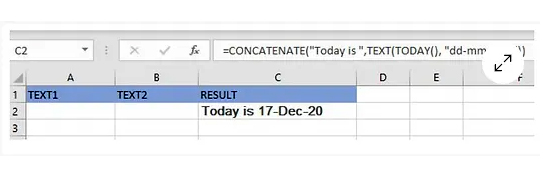
You can also bind a string and a computed value to the formula as in the example of restoring the current date

=CONCATENATE(“Today is ”, TEXT(TODAY(), “dd-mmm-yy”))

You can verify that the results provided by the CONCATENATE function are correct by doing the following:

In all cases, the result of the CONCATENATE function is a text string, even if all the source values are numbers

Make sure there is a text argument in the CONCATENATE function to ensure that it works

You have to pay close attention to the validity of the text argument in order for the CONCATENATE function to work correctly, otherwise the formula will return the error #VALUE! This is because the arguments are not valid

2.Len()

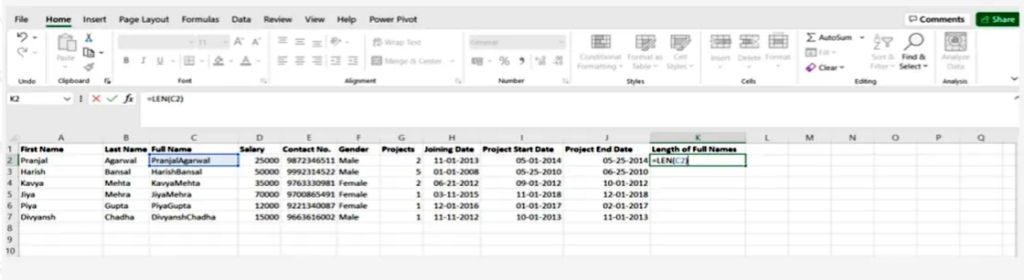
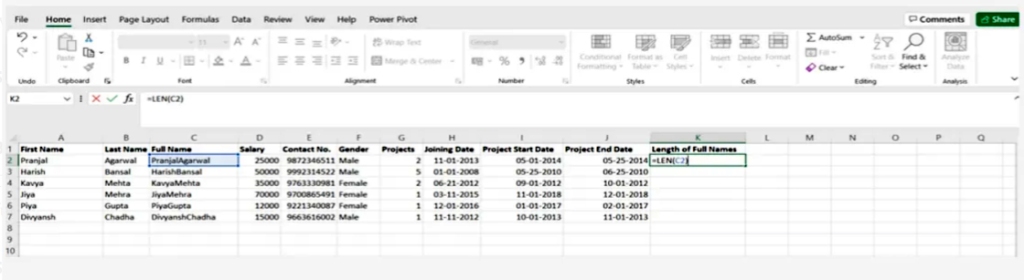
This function is used to know the number of characters in one cell, or when dealing with text that contains a limited number of characters, or to know the difference between the numbers of a group of products

SYNTAX = LEN (text)

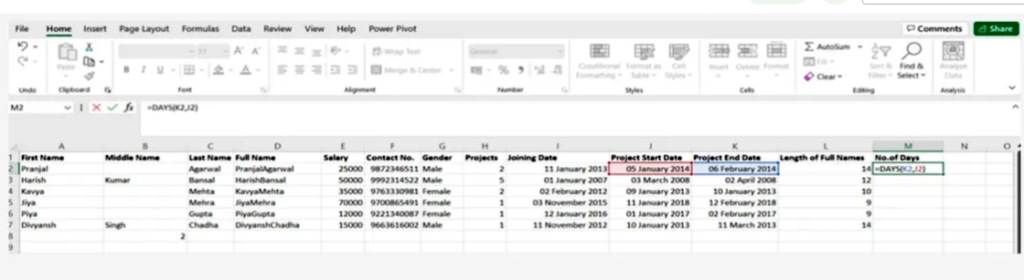
3.Days()

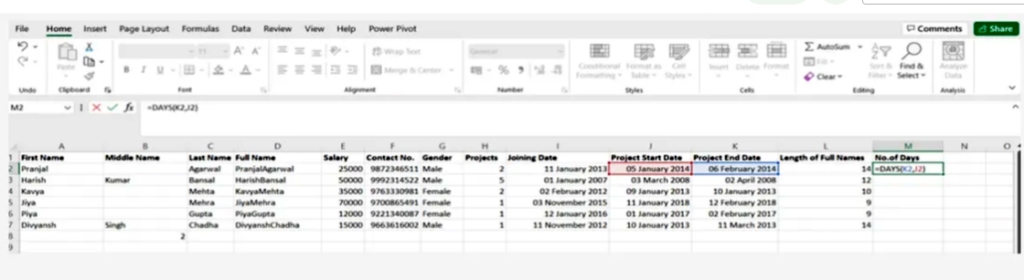
This function is used to calculate the number of days between two dates

SYNTAX = DAYS (end_date, start_date)

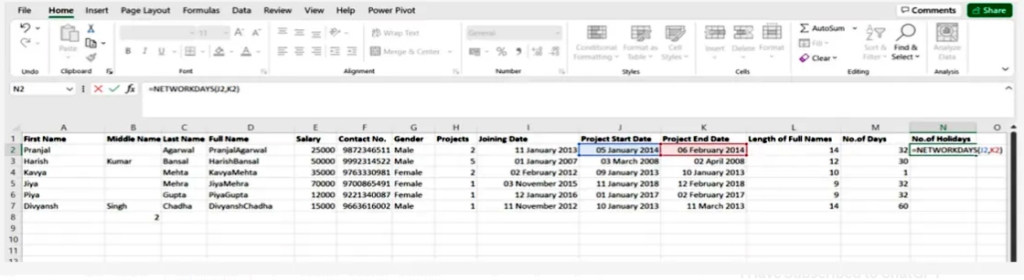
4.Networkdays

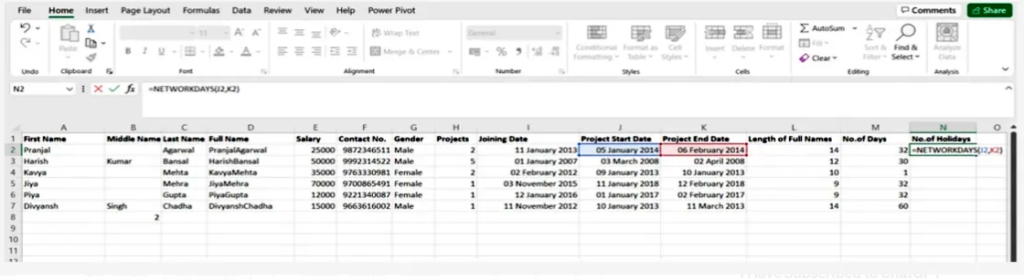
It is considered to be a function of date and time in Excel and is often used by finance and accounting departments to exclude the number of weekends to determine the wages of employees based on the calculation of actual working days for them or the calculation of the total number of working days for a specific project

SYNTAX = NETWORKDAYS (start_date, end_date, [holidays])

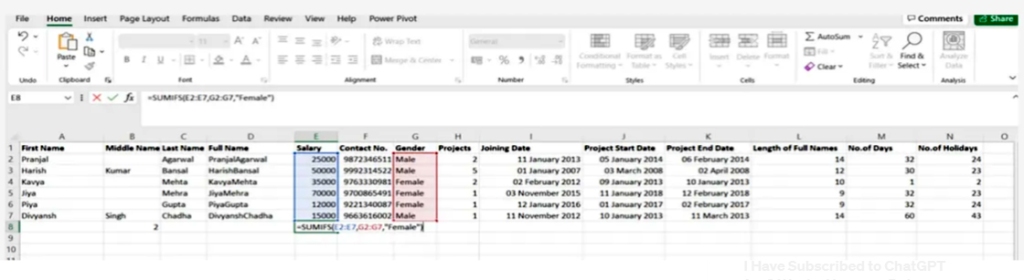
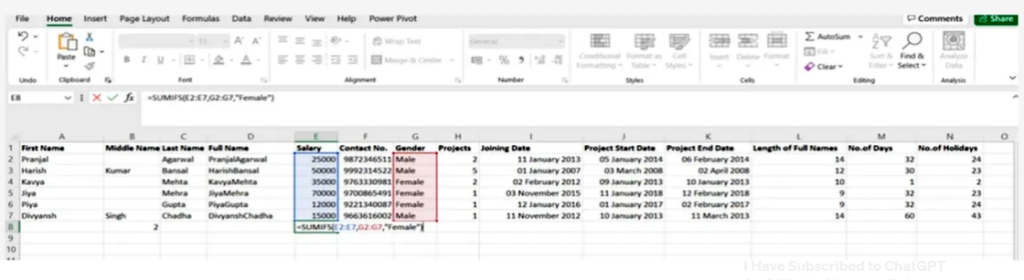
5.Sumifs()

It is one of the most common formulas in Excel and is considered one of the most important functions for data analysts =SUMIFS. =SUM, especially for conducting data collection under sample conditions

SYNTAX = SUMIFS (sum_range, range1, criteria1, [range2], [criteria2], …)

Advertisements

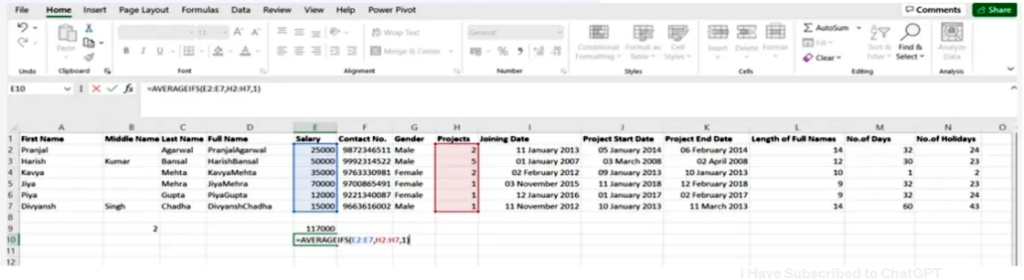
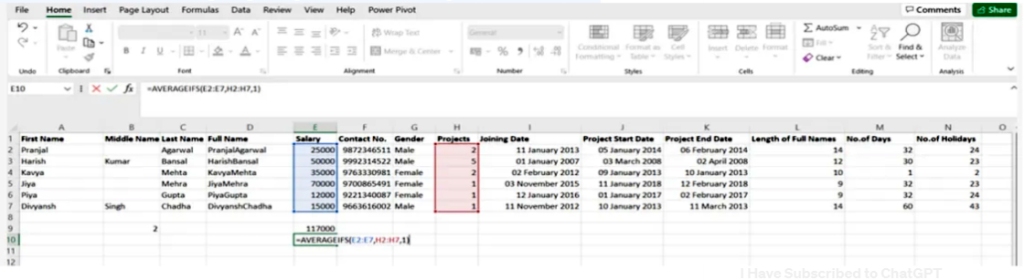
6. Averageifs()

This task allows the average to be extracted from one or more parameters

SYNTAX = AVERAGEIFS (avg_rng, range1, criteria1, [range2], [criteria2], …)

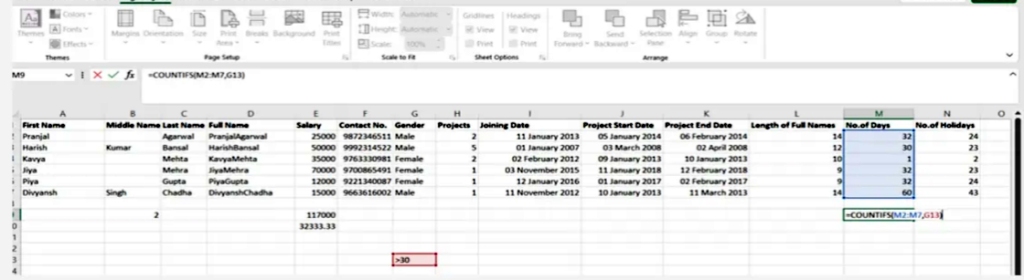
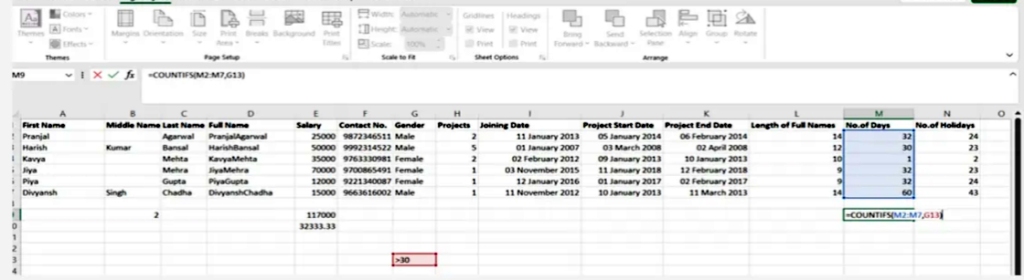
7. Countsifs()

It is an important tool in data analysis and it is similar to SUMIFS. In most functions it counts the number of values that satisfy certain conditions but it doesn’t need a summation range

SYNTAX = COUNTIFS (range, criteria)

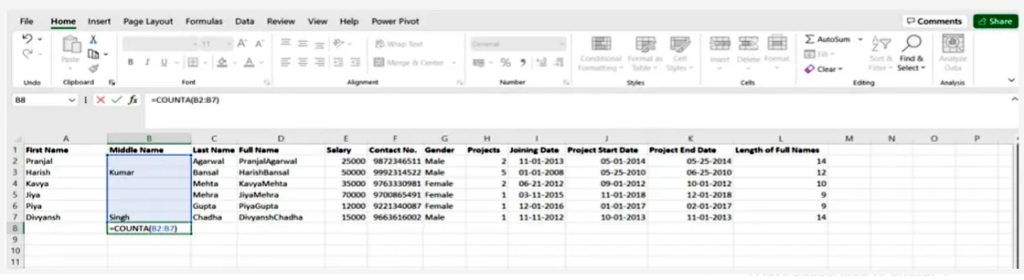
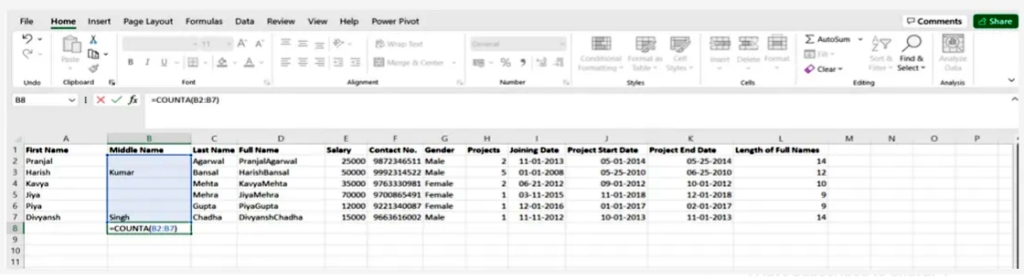
8.Count()

Its job is to determine whether a cell is empty or not by discovering gaps in the data set without you, as a data analyst, having to restructure it.

SYNTAX = COUNTA (value1, [value2], …)

9. Vlookup()

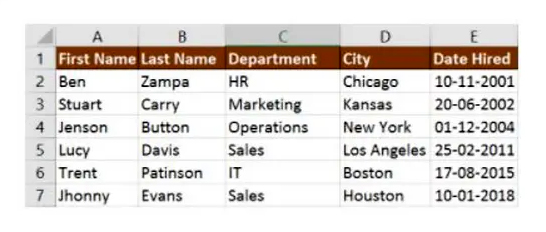
This shortcut stands for Vertically searching for a value in the leftmost column of the table so that you can return a value in the same row of the column you specify

SYNTAX = VLOOKUP (lookup_value, table_array, column_index_num, [range_lookup])

We will explain the arguments to the VLOOKUP function

– lookup_value : is the value to look up in the first column of the table

table – : indicates the table from which the value is to be retrieved

-col_index: returns the column in the table from the value

range_lookup – :

Optional: TRUE = approximate match

Default: FALSE = exact match

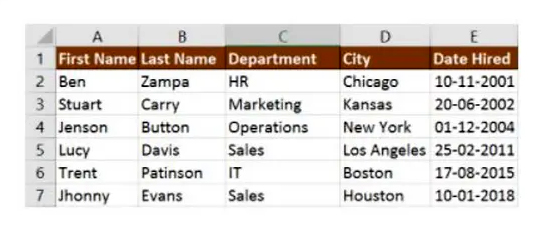
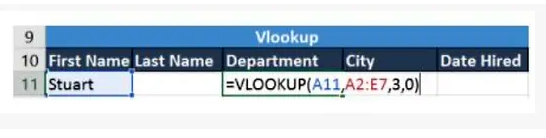
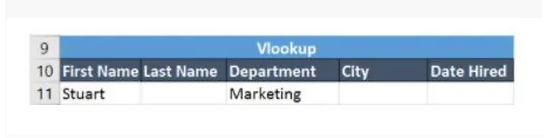
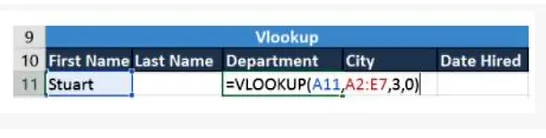
The following table will explain the use of VLOOKUP

Cell A11 contains the lookup value

A2:E7 is the table array

3 is the column index with the information for the sections

0 is the search for the range

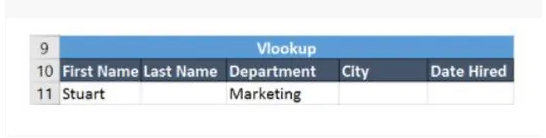
If you press the Enter key, it will return “Marketing”, which indicates that Stuart works in the marketing department

10. Lookup()

In it, “horizontal” is represented by the letter H, and it searches for one or more values in the top row of the table, then it retrieves a value from a row you specify in the table or row from the same column if this tool makes things easier, for example when the values you use are in the rows The first one from the spreadsheet and you need to look at a certain number of rows, this tool will do the trick

SYNTAX = HLOOKUP (lookup_value, table_array, row_index, [range_lookup])

Let’s learn about Hlookup’s arguments

Lookup_Value denotes the attached value

table — the table from which you need to retrieve data

ROW_INDEX which is the row number to restore the data

Range_lookup for exact and approximate matching, and that is determined by specifying the validity of the default value, so the match is approximate

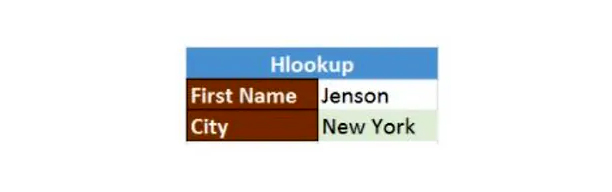
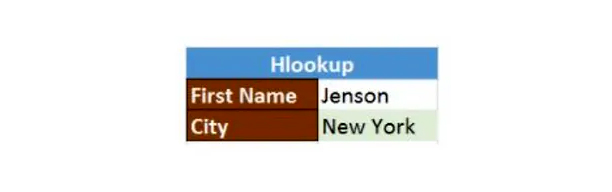
In our next example, we’ll search for the city Jenson is from using Hlookup.

The search value shown in H23 is Jenson

G1: M5 is the table array

4 is the row index number

0 is for an approximate match

Pressing enter will take you back to New York.

at the end

We conclude from the above how effective Excel is in analyzing data. By learning its formulas and functions, you can make work easier for you and thus save a lot of time and effort.

Advertisements

عشرة وظائف لإكسل في تحليل البيانات

Advertisements

يعتبر برنامج إكسل من البرامج التي تتمتع بميزات وخصائص تعين المستخدم على تحليل البيانات بسهولة ونظراً لما يوفره من صيغ ووظائف متعددة قادرة على تنفيذ مجوعة عمليات سنتناول منها في مقالنا هذه وظائف العمليات الحسابية ومهام نصوص الأحرف والتاريخ ومجموعة أخرى من مهام البحث

CONCATENATE 1

تعتبر هذه الصيغة من الصيغ الأكثر فاعلية في تحليل البيانات رغم سهولتها وبساطة العمل بها وهي مهمتها استخدام التواريخ والنصوص والأرقام وبيانات مختلفة موجودة في عدة خلايا ودمجها في خلية واحدة

SYNTAX = CONCATENATE (text1, text2, [text3], …)

تسلسل قيم خلايا متعددة

CONCATENATE صيغة

A2 و B2 البسيطة لقيم خليتين

هي كما يلي

= CONCATENATE (A2، B2)

“ “سيتم دمج القيم بدون استخدام أي محدد ، ولفصم القيم بمسافة نستخدم

=CONCATENATE(A3, “ “, B3)

ربط سلسلة من النصوص والقيمة المحسوبة

كما ويمكنك ربط سلسلة نصية وقيمة محسوبة بالصيغة كما في المثال الموضح عن استعادة التاريخ الحالي

=CONCATENATE(“Today is “, TEXT(TODAY(), “dd-mmm-yy”))

ويمكنك التأكد من صحة النتائج التي تقدمها

CONCATENATE الدالة

من خلال اتباع ما يلي

في جميع الأحوال تكون نتيجة *

CONCATENATE الدالة

عبارة عن سلسلة نصية وإن كانت جميع قيم المصدر أرقاماً

احرص على وجود وسيطة نصية في *

CONCATENATE دالة

لضمان عملها

وعليك أن تنتبه جيداً من صحة الوسيطة النصية لكي تعمل *

CONCATENATE الدالة

بشكل صحيح وإلا فالصيغة

#VALUE! سترجع لك الخطأ

وهذا سببه أن الوسيطات غير صالحة

Len() 2.

تستخدم هذه الدالة لمعرفة عدد الأحرف في الخلية الواحدة ، أو عند التعامل مع نص يحوي عدد محدود من الأحرف أو معرفة الاختلاف بين أرقام مجموعة من المنتجات

SYNTAX = LEN (text)

Days() 3.

تستخدم هذه الدالة لحساب عدد الأيام الواقعة بين تاريخين

SYNTAX =DAYS (end_date, start_date)

Networkdays4.

وهي تعتبر أنها دالة التاريخ والوقت في إكسل وتستخدم غالباً من قبل أقسام المالية والمحاسبة لاستبعاد عدد عطلات نهاية الأسبوع لتحديد أجور الموظفين بناءً على حساب أيام العمل الفعلية لهم أو حساب عدد كامل أيام العمل لمشروع معين   

SYNTAX = NETWORKDAYS (start_date, end_date, [holidays])

Sumifs() 5.

وهي من الصيغ المتداولة بكثرة في إكسل وتعتبر من أهم الوظائف بالنسبة لمحللي البيانات

=SUMIFS. =SUM

وخصوصاً لإجراء عملية جمع للبيانات وفق شروط معينة

SYNTAX = SUMIFS (sum_range, range1, criteria1, [range2], [criteria2], …)

Advertisements

Averageifs() 6.

تتيح هذه المهمة استخلاص المتوسط من معلمة واحدة أو أكثر

SYNTAX = AVERAGEIFS (avg_rng, range1, criteria1, [range2], [criteria2], …)

Countsifs() 7.

من الأدوات المهمة في تحليل البيانات

SUMIFS. وهي تتشابه مع

في معظم الوظائف فهي تقوم بحساب عدد القيم التي تحقق شروط معينة إلا أنها لا تحتاج إلى نطاق جمع

SYNTAX = COUNTIFS (range, criteria)

8. Counta()

مهمتها هي أن تحدد هل الخلية فارغة أم لا من خلال اكتشاف الفجوات الموجودة في مجموعة البيانات دون أن تضطر كمحلل بيانات إلى إعادة هيكلتها

SYNTAX = COUNTA (value1, [value2], …)

9. Vlookup()

يدل هذا الاختصار على البحث الشاقولي عن قيمة ما في العمود الكائن في أقصى يسار الجدول ليتسنى لك إرجاع قيمة في نفس الصف من العمود الذي تحدده

SYNTAX = VLOOKUP (lookup_value, table_array, column_index_num, [range_lookup])

VLOOKUP وسنقوم بشرح الوسيطات للدالة

lookup_value

هي القيمة التي عليك البحث عنها في العمود الأول من الجدول

table

يدل على الجدول التي يتم استرداد القيمة منه

col_index

يتيح استعادة العمود الموجود في الجدول من القيمة

range_lookup

اختياري : TRUE = approximate match

افتراضي : FALSE = exact match

VLOOKUP وسيوضح الجدول التالي استخدام

lookup تحوي قيمة A11 الخلية

هي صفوف الجدول A2: E7

رقم 3 هو فهرس العمود مع المعلومات الخاصة بالأقسام

رقم 0 هو البحث عن النطاق

Enter وفي حال الضغط على مفتاح

فسيعيد “التسويق” وهذه دلالة على أن

يعمل في قسم التسويق Stuart

10. Hlookup()

“وفيه يمثل “الأفقي

H بالحرف

وهو يبحث عن قيمة واحدة أو أكثر في الصف العلوي من الجدول، ثم يقوم باستعادة قيمة من صف تحدده في الجدول أو الصف من نفس العمود إذا تقوم هذه الأداة بتسهيل الأمور أكثر فمثلاً عند تكون القيم التي تستخدمها موجودة في الصفوف الأولى من جدول البيانات واحتجت إلى أن تتطلع على عدد صفوف معين فهذه الأداة تفي بالغرض 

SYNTAX = HLOOKUP (lookup_value, table_array, row_index, [range_lookup])

Hlookup لنتعرف على وسيطات

Lookup_Value  

يدل على القيمة المرفقة

table — 

وهو الجدول الذي عليك استعادة البيانات منه

ROW_INDEX

وهو رقم الصف لاستعادة البيانات

Range_lookup

للمطابقة الدقيقة والتقريبية وذلك يتحدد بتحديد صحة القيمة الافتراضية فبصحتها يكون التطابق تقريبي

في مثالنا التالي سنقوم بالبحث عن المدينة

Jenson التي ينتمي إليها

Hlookup. باستخدام

Jenson وهي H23 تظهر قيمة البحث في

هي صفوف الجدول G1: M5

رقم 4 فهرس الصف

رقم 0 اختبار تقريبي

Enter وبالضغط على  

“سيعيدك إلى ” نيويورك  

وفي الختام

نستخلص مما سبق مدى فاعلية إكسل في تحليل البيانات فبتعلمك صيغه ووظائفه يمكنك تسهيل العمل عليك وبالتالي توفر الكثير من الوقت والجهد 

Advertisements